
If you’re planning a new home theater or upgrading an older setup, you’ve probably hit the same question a lot of homeowners run into: should you go with a 4K projector or stick with 1080p? On paper, 4K seems like the obvious choice. It has four times the pixels, supports HDR, and is what most new content is mastered in. But the actual difference between the two on a real home theater screen depends on a lot more than just the spec sheet. Things like screen size, viewing distance, room lighting, and the content you actually watch all play a role in whether the upgrade is worth the money. In this post, we’ll break down what’s actually different between a 4K projector and a 1080p one, how big of a visual difference you’ll really notice in your room, what else 4K brings to the table, and when the upgrade is genuinely worth it. By the end, you’ll have a clear sense of whether 4K is the right call for your space.
What’s the Difference Between a 4K Projector and a 1080p Projector?
The biggest difference between a 4K projector and a 1080p projector is resolution, which is just a measurement of how many individual pixels make up the image on screen. A 1080p projector displays an image that is 1920 pixels wide by 1080 pixels tall, which works out to roughly 2 million pixels per frame. A 4K projector displays an image that is 3840 by 2160, or about 8.3 million pixels per frame. That’s four times the total pixel count, which means more detail, sharper edges, and finer texture in the picture.
Beyond raw pixel count, 4K projectors typically come with newer processing, better contrast handling, and improved color reproduction. That’s because the projector category as a whole has advanced quite a bit in the years since 1080p became the standard. So when you’re comparing a 1080p projector to a 4K projector, you’re often comparing not just resolution but two different generations of display technology.
How Noticeable Is the Difference in a Real Home Theater?
This is where the conversation gets interesting, because the answer is not nearly as simple as the spec sheet suggests. Whether you actually notice the resolution upgrade depends on three big factors: screen size, viewing distance, and content.
The general rule is that the closer you sit to the screen and the larger the screen is, the more you’ll see the benefit of 4K. There’s a point at which the human eye simply can’t resolve more detail. If you’re sitting far enough away from a 100 inch screen, your eyes will not be able to distinguish a 4K image from a 1080p image. But if you’re sitting closer, or your screen is larger, that resolution starts to matter. The Society of Motion Picture and Television Engineers has formalized viewing angle recommendations that home theater designers use as a baseline when planning seating distances. If your seating is set up closer to the screen, you’ll get more out of 4K.
Here are the situations where the difference between 1080p and 4K is most noticeable:
- Larger screens, typically 110 inches and up
- Closer seating distances relative to the screen size
- Dedicated theater rooms with controlled lighting
- Content that is natively mastered in 4K with HDR
- Side by side comparisons in showroom or demo environments
And here are the situations where the difference is less noticeable:
- Smaller screens under 100 inches
- Long viewing distances relative to screen size
- Rooms with significant ambient light
- Content that is mostly 1080p or upscaled
- Casual TV watching where image fidelity is not the priority
The honest takeaway is that 4K is a real upgrade in the right room, with the right screen, and the right content. In the wrong setup, you may not see a meaningful difference at all.
What Else Do You Get With a 4K Projector Beyond Resolution?
Resolution is the headline feature, but it’s not the only thing you’re paying for when you step up to a 4K projector. The newer models bundle in several other improvements that can be just as impactful as the pixel count, sometimes more so.
HDR support. High Dynamic Range, or HDR, expands the range of brightness and contrast in the image. Highlights look brighter, shadows look deeper, and the overall image has more dimension and realism. There are a few HDR formats to be aware of, including HDR10, HDR10+, Dolby Vision, and HLG, and not every projector supports every format. For many viewers, the impact of HDR is more visually striking than the resolution upgrade itself.
Better contrast and black levels. Modern 4K projectors tend to have improved laser or LED light sources, dynamic iris systems, and processing that delivers deeper blacks and a more cinematic image. Black level is one of the most important factors in how immersive a projected image feels, and 4K projectors are generally stronger here than older 1080p models.
Gaming-friendly specs. If you plan to game on the projector, 4K models often support higher refresh rates, low input lag modes, and HDMI 2.1 connections that allow for 4K at 120Hz from current generation consoles and PCs. This is a meaningful upgrade for gamers and is hard to find in older 1080p projectors.
So when you’re weighing 4K against 1080p, you’re not just deciding on resolution. You’re deciding on a whole package of image quality improvements.
When Is Upgrading to a 4K Projector Actually Worth It?
There’s no universal answer here, but there are a handful of scenarios where the 4K upgrade is almost always worth it for homeowners. Here are the most common ones.
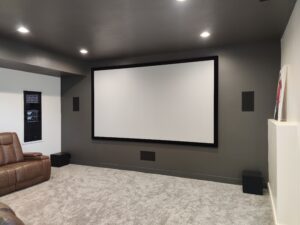
You’re building a dedicated theater room. If you’re putting in the effort and budget to create a real home theater with controlled lighting, proper seating, and a large screen, a 4K projector is the natural choice. The room is designed to showcase image quality, and 4K is what shows it off.
Your screen is 110 inches or larger. At that size, the pixel density of a 1080p projector starts to become visible, especially from typical seating distances. 4K resolution keeps the image sharp and detailed even on a large canvas.
You game on the projector. Modern consoles and gaming PCs output in 4K with HDR and high refresh rates. A 4K projector with HDMI 2.1 unlocks that experience in a way a 1080p projector simply cannot.
That said, there are also situations where a well chosen 1080p projector still makes sense. A smaller media room, a multi-purpose space with ambient light, a casual second viewing area, or a tighter budget can all be valid reasons to go with 1080p. A great 1080p setup will still look incredible to most viewers, especially when the rest of the system is designed around it.
Why Projector Planning and Installation Matter for the Final Result
Whichever resolution you choose, the projector itself is only one piece of the puzzle. The way the system is planned and installed has just as much to do with how the final image looks as the spec sheet does. Here are some of the planning factors that often make or break a projector setup.
Throw distance and projector placement. Every projector has a throw ratio, which determines how far it needs to be from the screen to produce an image of a given size. Getting this wrong can mean an image that’s too small, too dim, or positioned awkwardly in the room.
Screen size and seating layout. The screen and the seating should be planned together. Too large a screen with seats too close will reveal flaws in the image. Too small a screen with seats too far will make 4K resolution invisible.
Screen material. Not all screens are equal. Some screens have a higher gain that bounces more light back to the viewer, which can help in rooms with some ambient light. Ambient light rejecting screens are designed for rooms that can’t be fully darkened. The right screen for your room and your projector matters more than most people realize.
Lighting control. Even a great 4K projector with HDR will look washed out in a room with uncontrolled light. Blackout shades, dimmable lighting scenes, and dark room finishes all play a role in how the image actually looks.
Cabling and source equipment. 4K with HDR over long cable runs can be tricky. HDMI cable quality, fiber optic HDMI, and source device capability all need to be planned correctly so the signal reaches the projector intact.
Calibration. Every projector benefits from professional calibration, where brightness, contrast, color, and gamma are dialed in for the specific room and screen. A calibrated projector almost always outperforms a higher specced projector running on factory settings.
This is the part of the process that’s easy to underestimate but where the difference between a good home theater and a great one usually lives.
AIS Can Help you Choose and Install a Home Theater Projector
4K projector can absolutely transform a home theater, but the upgrade is only worth it when the rest of the setup is designed to support it. Screen size, viewing distance, lighting control, screen material, and the content you actually watch all factor into whether you’ll see the difference 4K offers. For some homeowners, the jump from 1080p to 4K is striking, especially in a dedicated theater room with a large screen and proper light control. For others, a well-designed 1080p setup at the right screen size and viewing distance still looks incredible and saves a meaningful chunk of the budget for other parts of the system. AIS designs and installs custom home theaters across Northern Utah, including projector selection, screen choice, lighting integration, motorized shades, and audio. Whether you’re leaning toward 4K, 1080p, or aren’t sure yet, we’ll help you put together a system that fits your room and the way you actually watch. Contact us today or use our budget calculator to plan expenses!